
License code
Clear setup. Real network checks.
Get a Unetwork App License Code
Use your phone to help test real mobile networks.
Claim a license code from ReferMobile, add it to the Unetwork App, and earn rewards when eligible checks run in the background.
ReferMobile is not officially affiliated with Unetwork. ReferMobile is a Unetwork Node Operator that owns and can lease Unetwork licenses. App setup, task eligibility, rewards, and withdrawals happen through Unetwork systems.
Your Unetwork License
Get a Unetwork App license code in one tap.
Get the best available split with ReferMobile. Copy it into the Unetwork App to activate your license.
Install
Download the Unetwork App.
Claim
Get the best available license code.
Connect
Keep the app online for eligible tasks.
Live reward split
--%
To you
--%
To node operator
YouNode operator
Checking the best available split.
What Unetwork does
Unetwork uses your phone to run real-world telecom checks, helping service providers measure how their networks perform.
01
Automated checks
Your phone runs approved network tests from real devices, networks, and locations.
02
Verify international calling routes
Checks whether calls route correctly across operators and regions.
03
Confirm data integrity
Confirms Caller ID and SMS details match what the sender entered.
Why it exists
Why Unetwork exists
Telecom teams need real-world proof of how calls, texts, coverage, and connections behave on everyday phones.
01 / Real-world data
Service providers need real-world network data.
Internal systems show a lot, but they do not always show what people experience on actual phones, carriers, and locations.
02 / Phone-based checks
Unetwork lets phones run approved telecom checks.
Connected devices can test coverage, connectivity, international calling routes, SMS delivery, and Caller ID from real locations.
03 / Revenue share
Participants can earn from the data they provide.
When verified task data creates value for the network, participants can receive a share of the network revenue tied to their completed work.
Unetwork Operator (UNO)
Who is ReferMobile?
ReferMobile is a Unetwork Operator (UNO). We purchased a Unetwork Node and lease Unetwork licenses to people with compatible devices who want to contribute real-world network data.
We keep the process clear: request a lease code, activate it in the Unetwork App, and know where to ask for help. We do not operate Unetwork, its app, task systems, rewards, payouts, or withdrawals.
UNO
Node-backed license leases
ReferMobile purchased a Unetwork Node and leases available Unetwork licenses from its node allocation.
Device fit
Built for compatible phones
The best fit is a supported device that can stay online, charged, and ready for eligible background verification tasks.
Support
Transparent operator help
Ask questions about lease codes, License Operator setup, and activation checks in our Telegram and Facebook communities.
Quick Start Guide
How to activate your Unetwork license
Once your license code is ready, follow these steps to connect your phone and become eligible for background verification tasks in minutes.
Step 01
Download the Unetwork app
Get the app from the App Store or Google Play, then open it.
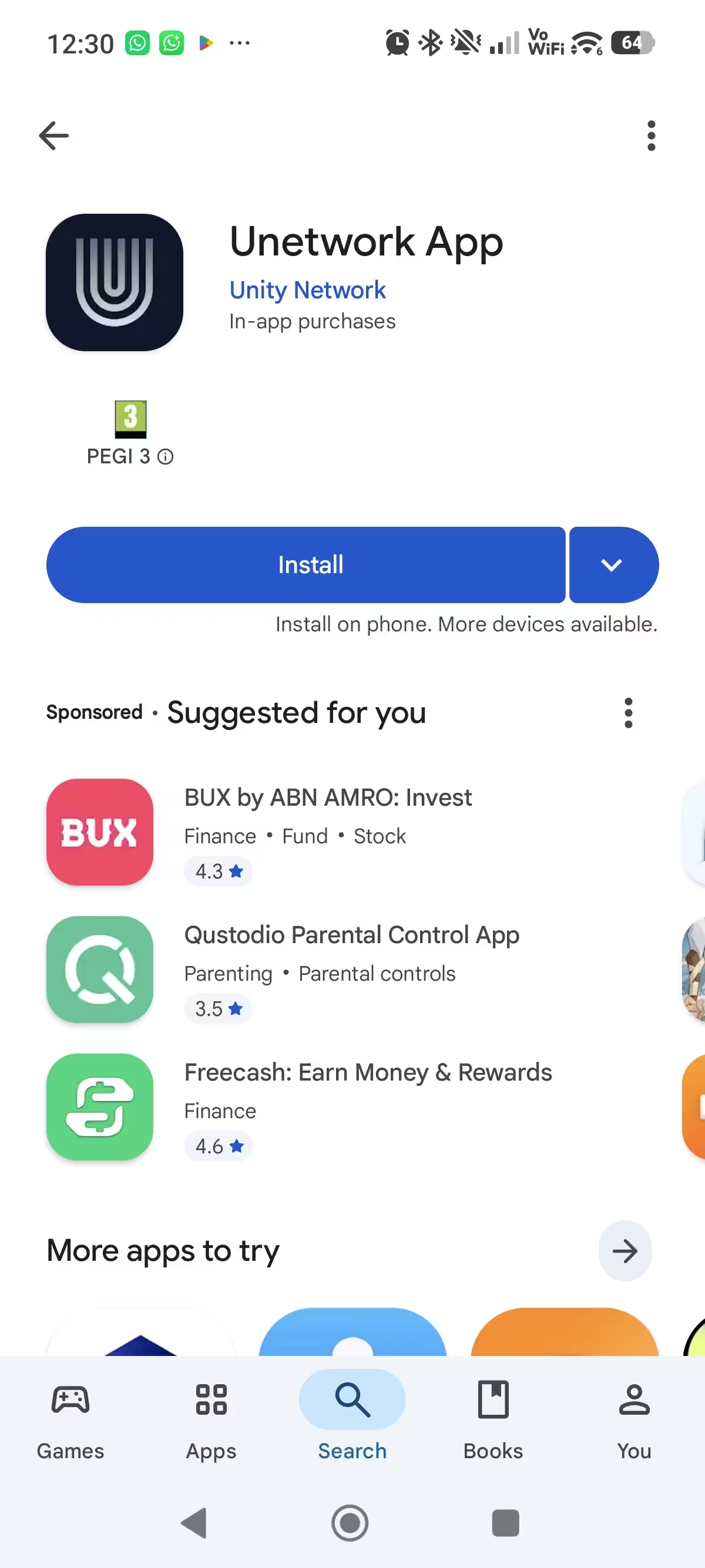
Step 02
Tap Get Started
On the Unetwork welcome screen, tap Get Started.
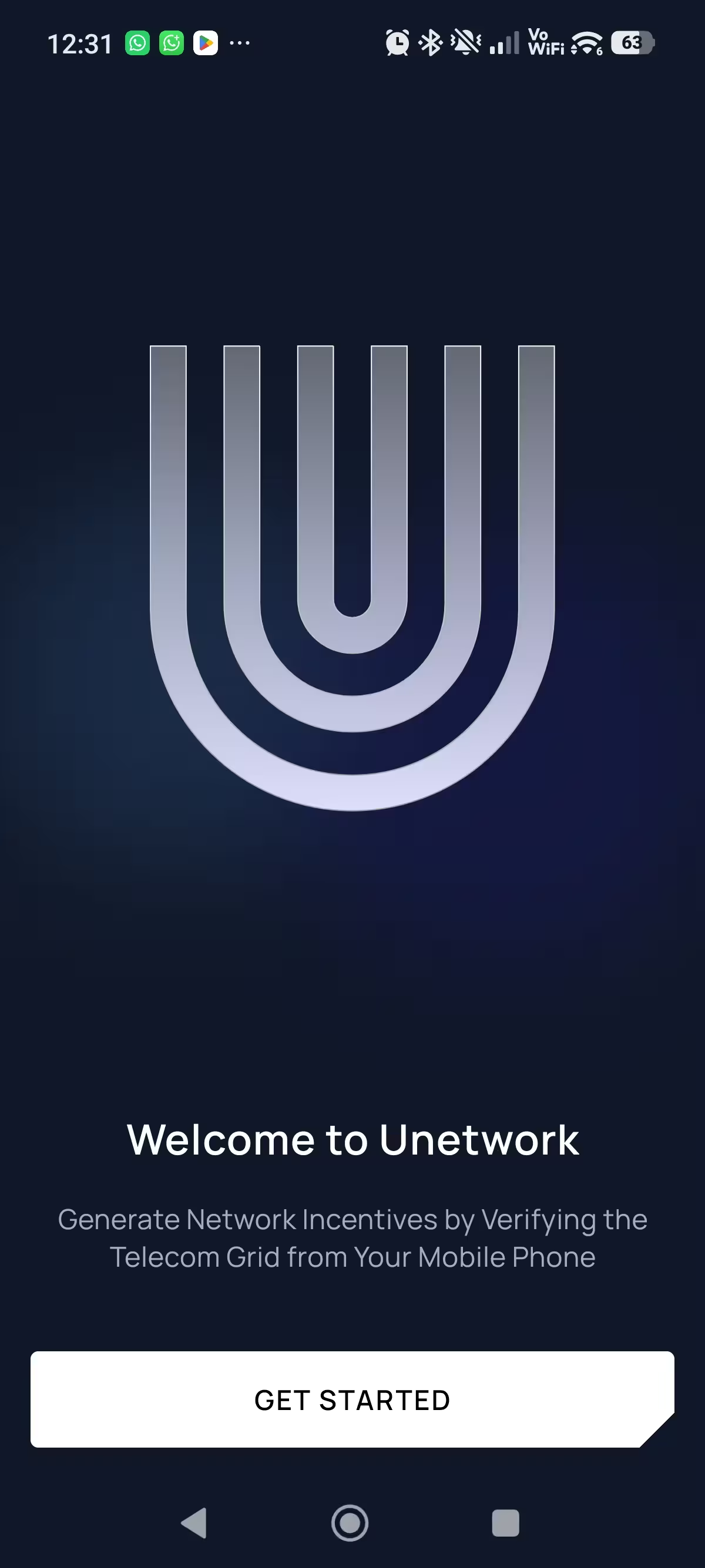
Step 03
Choose License Operator
On Choose role to get started, tap License Operator.
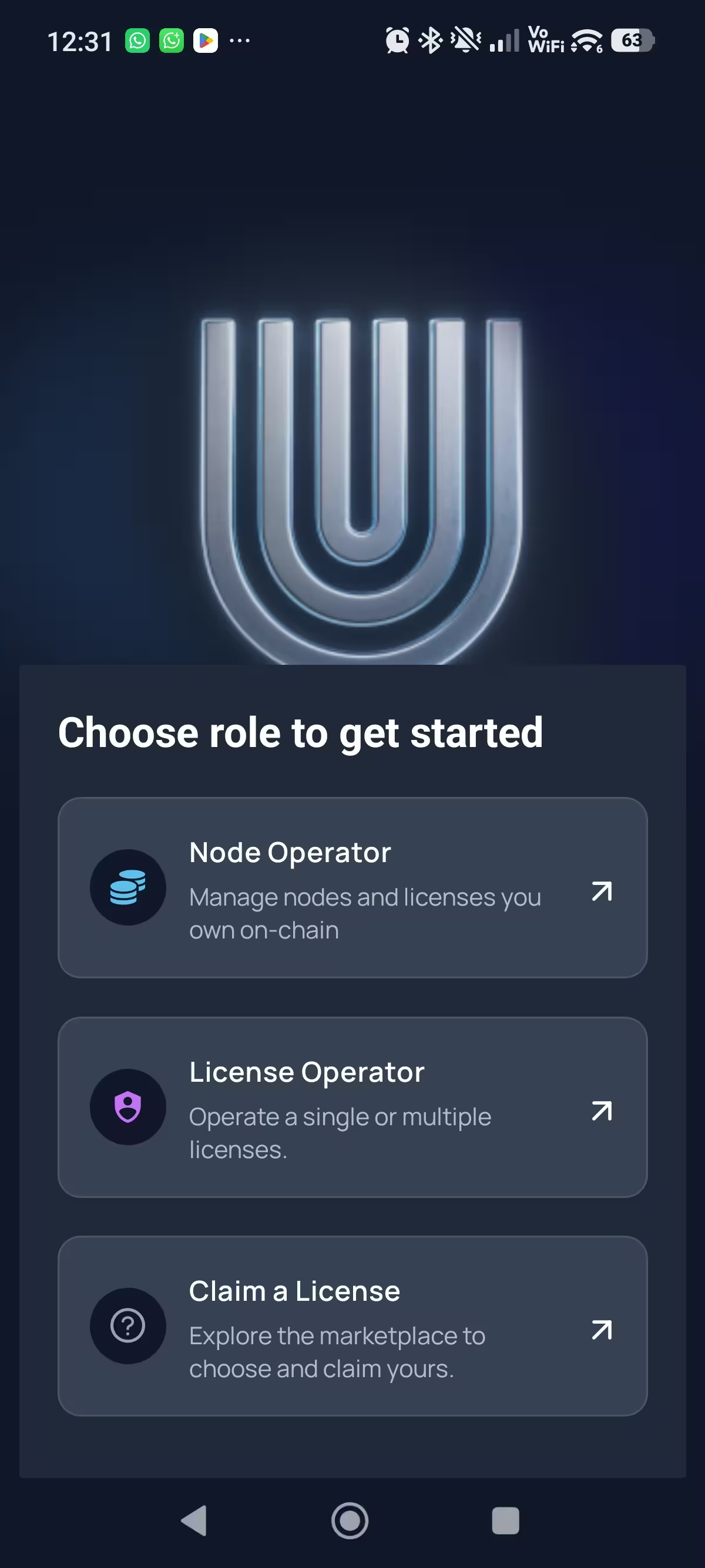
Step 04
Choose Enter a Lease Code
Choose Enter a Lease Code to open the lease-code screen shown here. No code yet?
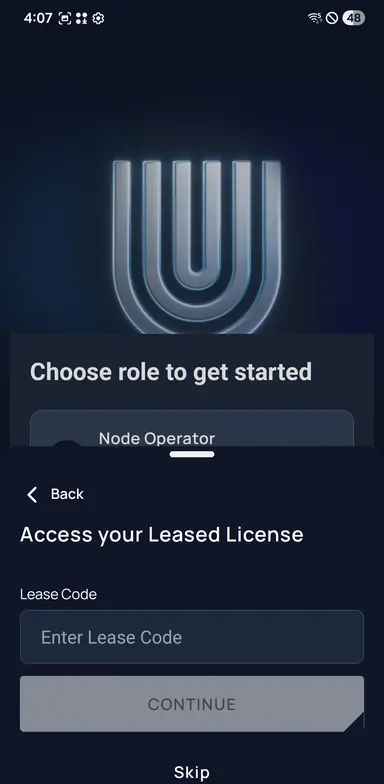
Step 05
Enter your lease code
Paste your lease code into the field and tap Continue.
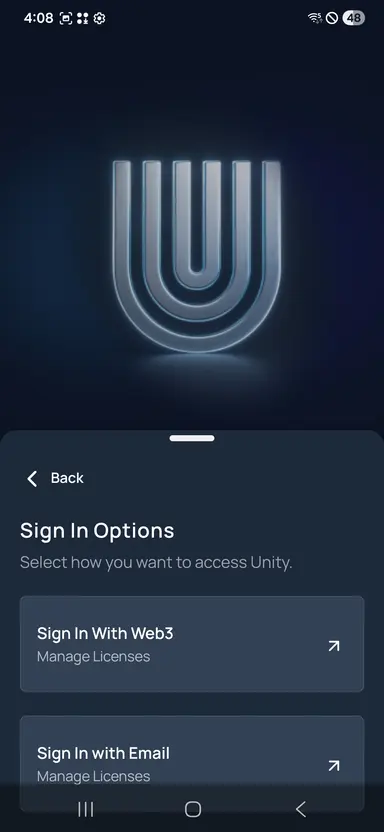
Step 06
Sign in with email
Back on Sign In Options, tap Sign In with Email, then enter your email when prompted.
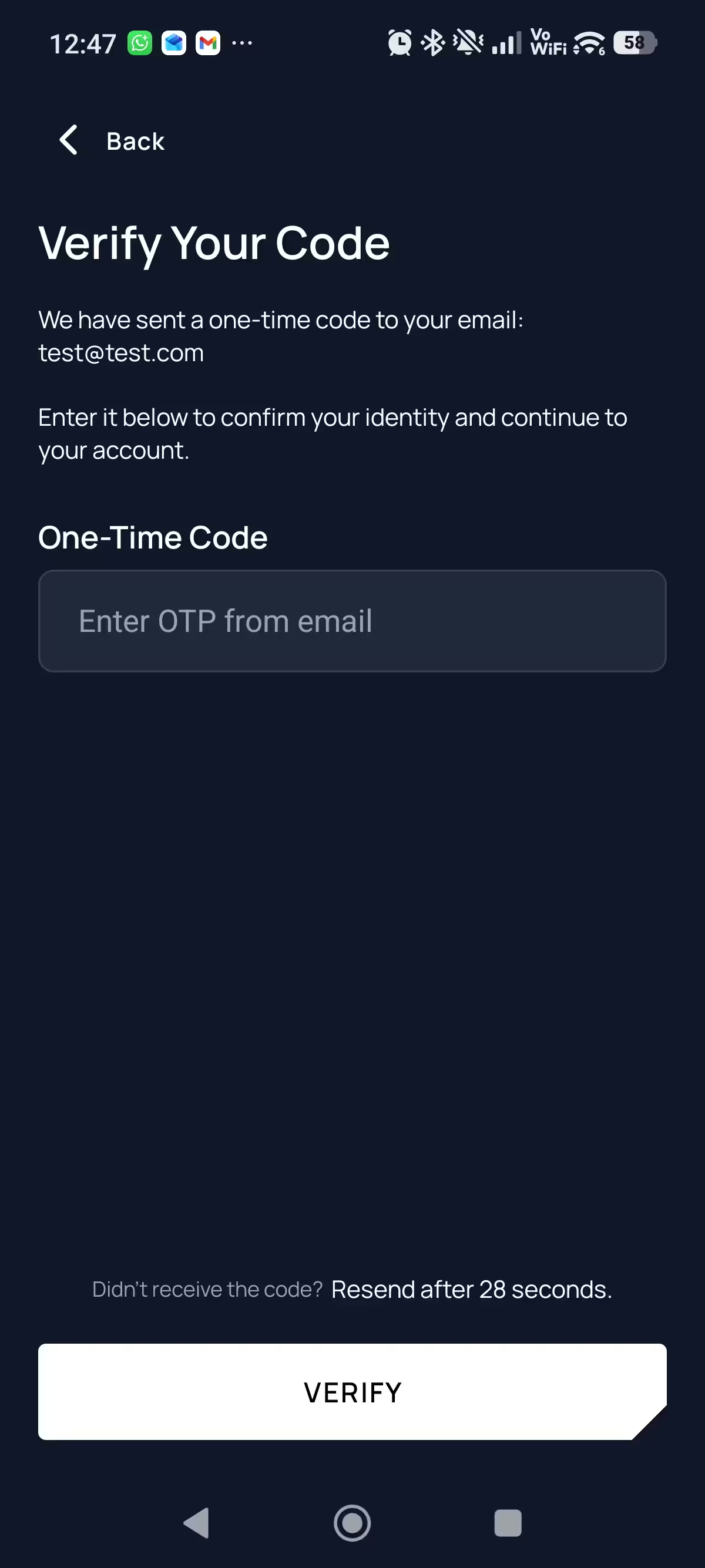
Step 07
Enter the one-time code
We email you a short one-time code. Enter it and tap Verify.
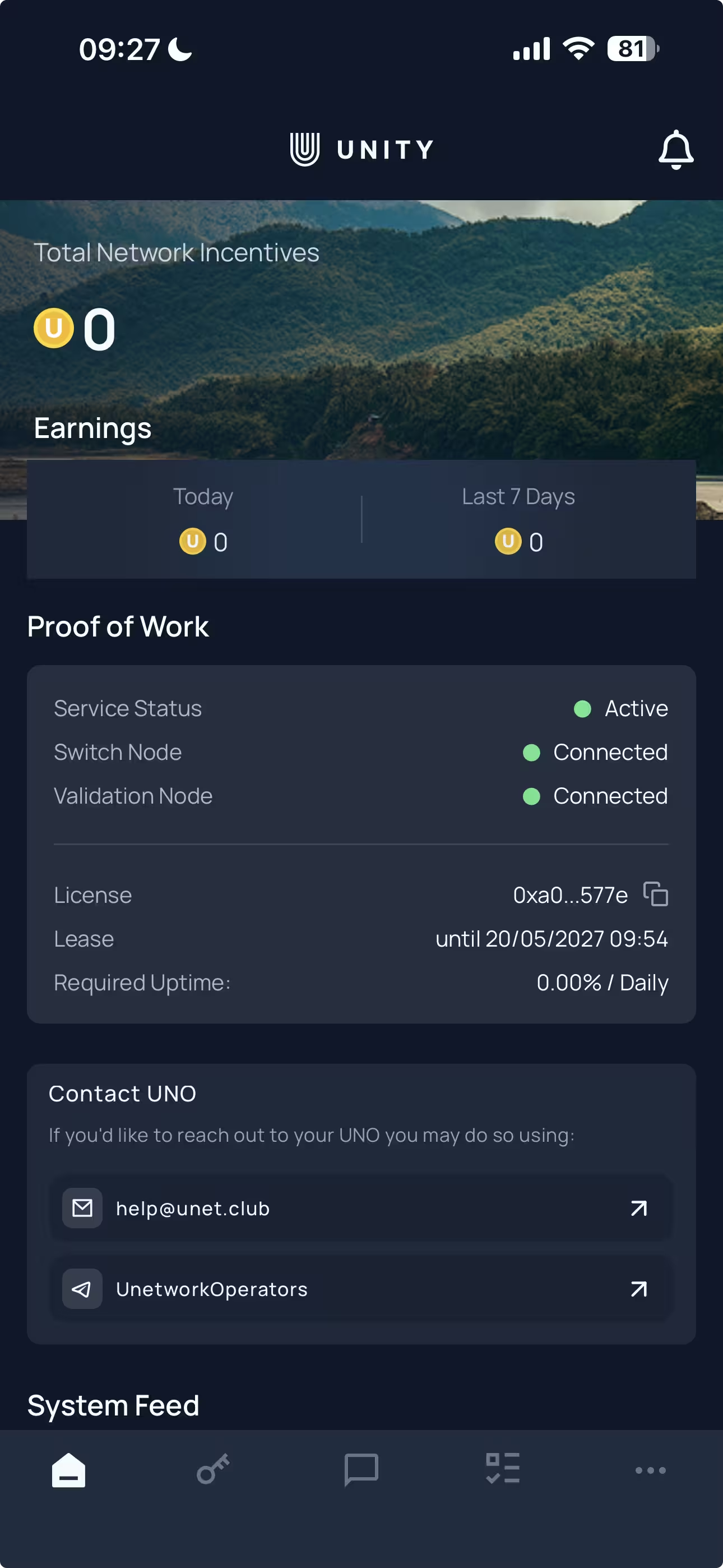
Step 08
Check for green lights
Make sure Service Status, Switch Node, and Validation Node are green. You are connected and ready for eligible tasks.
Tasks you can run
Tasks depend on device, region, app status, and network demand. You choose which tasks to enable when they are available.
Telemetry
Collects real-world network intelligence from active devices, live networks, and real locations.
Caller ID CLI Testing
Reports information from incoming test calls when that task is available to the device.
SMS CLI Testing
Reports information from incoming test SMS and helps verify messaging behavior on live networks.
Connectivity Verification
Checks signal strength and connection conditions from the place the phone is actually used.
ScoutQuest
Researches prepaid international call plans and submits source-backed details.
Entropy Generation
Uses device sensor signals to help produce random data for systems that need entropy.
Reward validation
Rewards are distributed for completed tasks.
Completed tasks still need to meet Unetwork validation rules. Actual rewards can vary with task volume, supported carriers, location, connection type, and device reliability.
- 01Client demand for testing in your market
- 02Country, city, and mobile network carrier
- 03Device quality and connection stability
- 04Phone uptime and background permissions
- 05Connection type and network reliability
- 06Successful validation of completed work
Payout options
Withdraw Unetwork rewards in digital assets or to your bank
Sign in, choose License Operator, and check Redeemable Rewards before entering payout details.
Open Unetwork portalReward unit
1 UP = 1 USD
Rewards are shown as UPs inside Unetwork systems.
Confirm the final screen
Check every detail before submitting.
Limits, fees, destination details, and quotes appear before the request is submitted.
Digital assets
Send UPs to a supported wallet.
Choose a crypto asset such as ETH, USDC, or BTC, then send it across the supported chain shown in the portal.
Crypto limits
Start from
5 UPs
Per request
150 UPs max
Check before submit
- Wallet address
- Selected asset
- Exact chain
Bank account
Withdraw UPs by bank transfer.
Receive rewards in USD, EUR, or GBP after identity verification and matching bank details are approved.
Bank limits
Start from
200 UPs
Per request
1000 UPs max
24-hour cap
1000 UPs
Check before submit
- Identity verification
- Matching account name
- USD, EUR, or GBP
Network builders
Unetwork is built by telecom companies
Telecom operators support the systems, infrastructure, and service demand behind Unetwork.
Minutes Network
Develops Unetwork's operator systems, task distribution, validation, and network coordination.
World Mobile
Unetwork uses EarthNodes and the World Mobile Chain to store the verification results.
Apex Telecom
Supports network service operations connected to real-world testing demand.
Glossary
The only terms you need before using your license code.
- Unetwork
- A people-powered telecom verification network that uses real devices to collect technical network data.
- License code
- The code pasted into the app to activate one license on a device.
- ULO
- Unetwork License Operator: the person operating an active license on a device.
- UNO
- Unetwork Node Operator: an operator who owns a node and leases associated licenses to ULOs.
Unetwork community
Join the Unetwork operator community.
Telegram, Facebook, and Reddit are places to ask questions, share setup tips, discuss rewards, and learn with other operators.
Telegram
Unetwork Operators on Telegram
Join Telegram to ask questions, share setup tips, and talk with other Unetwork operators.
Unetwork Operators on Facebook
Join the Facebook group to discuss Unetwork, share useful guides, and get help from the community.
Unetwork Operators on Reddit
Join Reddit to share questions, setup notes, reward experiences, and helpful Unetwork information.
FAQ
Quick answers before you set up your license.
- Tap Get Best License Code, complete the security check, then copy the code into the Unetwork App.
- No. Getting a license code from this page does not require payment.
- Each license has its own ULO and UNO split. Earnings vary by task demand, uptime, location, connection quality, and the license split.
- Keep the Unetwork App installed and your device online so eligible checks can run in the background.
- The app uses technical data needed to verify network activity, such as connection quality and device or network performance signals.
- Keep the support request ID if one appears, then retry after any cooldown or ask in the Unetwork Operators Telegram group.
How do I get a Unetwork license code?+
Does the code cost anything?+
How do rewards work?+
What should I do after claiming a code?+
What data does the app collect?+
What if my code does not load?+
Need account-specific help? Ask other operators in the Unetwork Operators Telegram group. ReferMobile does not approve tasks, calculate rewards, or process withdrawals.